InvoiceChief Invoicing Software Pricing
Simple Invoice Software Plans for Small Businesses
No Hidden Fees. No Per-Invoice Charges.
Start Your Business. We’re Here to Help.
Every successful business starts somewhere. Whether you’re a contractor, freelancer, or small business owner, you should be focused on serving customers and growing your business—not worrying about the cost of invoicing software.
InvoiceChief helps you create professional invoices, send estimates, manage customers, collect signatures, and track payments from your phone. Start free with all Premium features and create up to 6 invoices without paying.
Build your business first. Upgrade when you’re ready.
Free
For New Businesses
$0
- Up to 6 invoices
- All Premium features
- All professional invoice templates
- Customer signatures, on-site or remotely
- Estimates and customer management
- Payment tracking and document sharing
Premium
Run Your Business
$12.99/ month
or $119 / year
- Everything in Free
- No 6‑invoice limit
- Professional invoices and estimates
- All invoice templates and customer signatures
- Customer management and payment tracking
- Send by email, text message, and WhatsApp
- Complete CSV spreadsheet data export
- One business included
Chief Team
Grow With Your Team
$39.99/ month
or $399 / year
- Everything in Premium
- Professional invoices and estimates
- All invoice templates and customer signatures
- Customer management and payment tracking
- Five team spots for one business
- Team Member and Partner roles
- Owner controls and team activity tracking
- Manage your team’s work from one business account
- Instant Paid Invoice Calculator
Multi-Business Invoicing Plans
Optional Add-on
Additional Business
Running more than one business? InvoiceChief lets you manage multiple businesses from one account, without switching between different invoicing apps or remembering separate logins.
Each additional business has its own company information, customers, and invoice numbering. Add up to 7 additional businesses for a total of 8 independent business profiles.
+$6.99/ month per additional business
Requires an active Premium or Chief Team subscription.
Multi-Business Invoicing Software
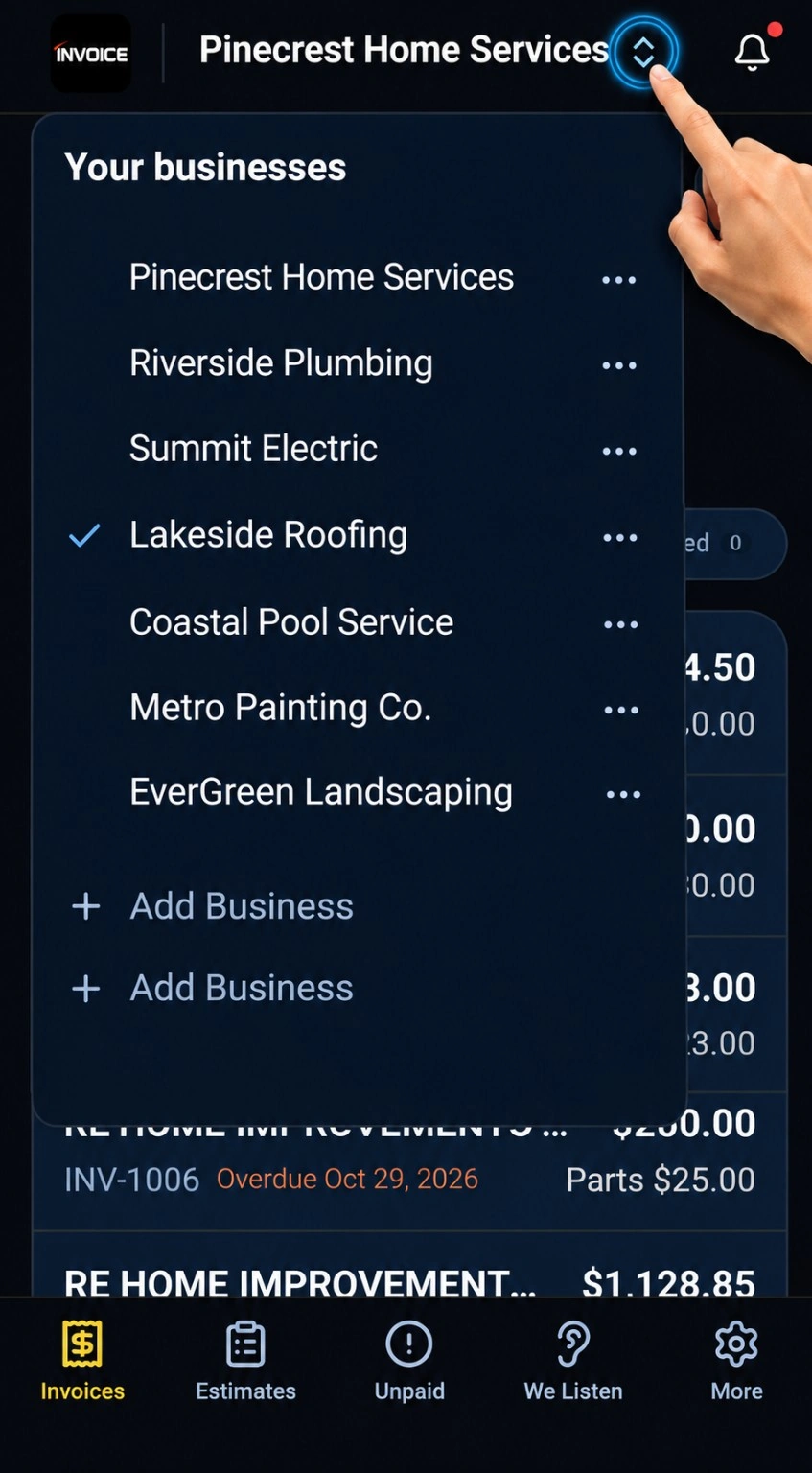
Run Up to 8 Independent Businesses from One Login
Own more than one business? Manage them all with InvoiceChief. Whether you operate a plumbing company, electrical service, roofing business, or another small business, you can switch between up to 8 independent business profiles from one account.
Every business keeps its own company name, logo, contact information, tax settings, customer list, and invoice numbering. Create professional invoices and estimates, manage customers, and track payments separately for each business.
One login. Multiple businesses. Everything organized.
Electronic Signatures for Invoices
Get Customer Signatures Right from Your Phone
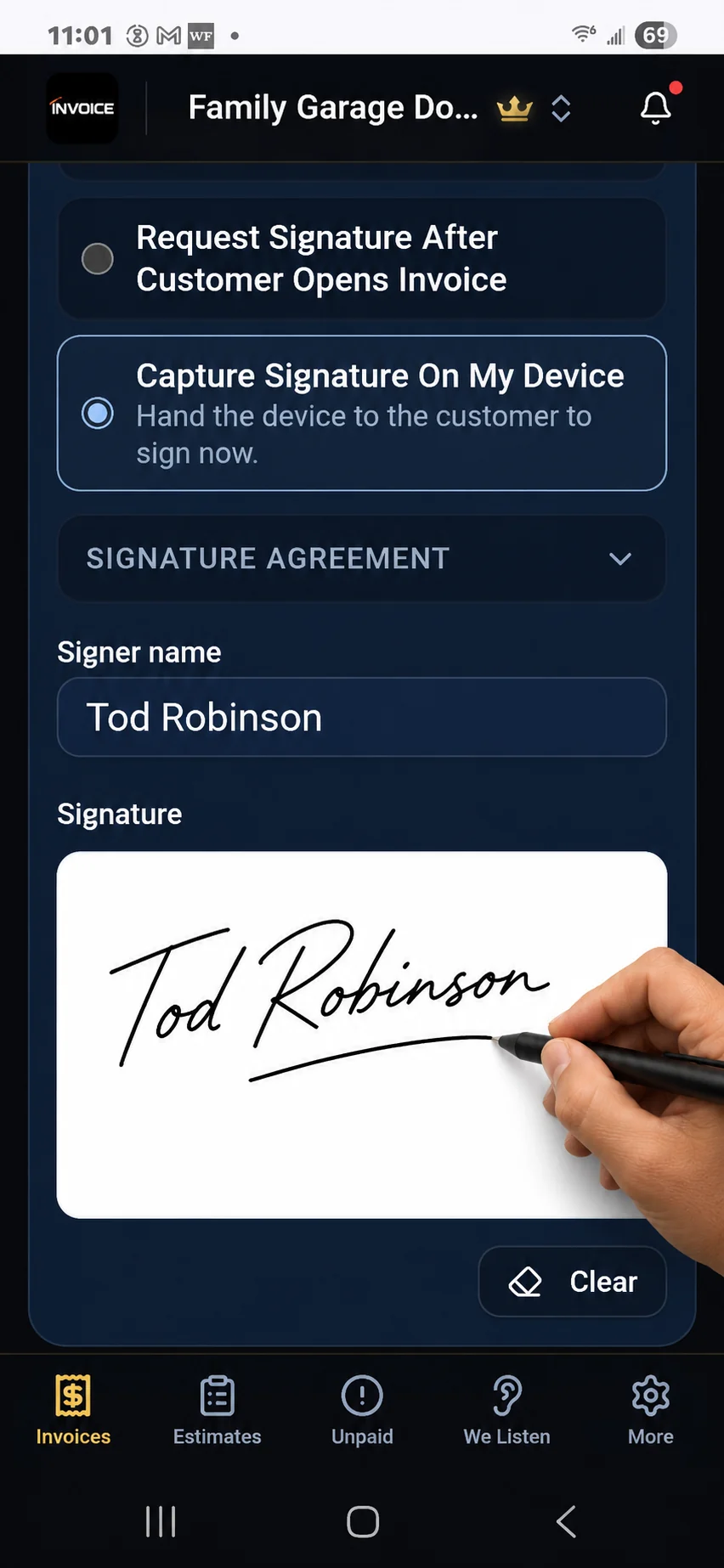
Need a customer’s signature on an invoice? InvoiceChief makes it easy to collect electronic signatures directly on your phone or send a secure signing link by email, text message, or WhatsApp.
Customers can review and sign invoices remotely without downloading an app or creating an account. Whether you’re at the job site or sending an invoice after the work is completed, the process is simple for you and your customer.
Less paperwork. Fewer delays. A professional experience for every customer.
Team Invoicing Software for Contractors
Build Your Team in Minutes with InvoiceChief
Invite Workers and Partners. Manage Your Business Together.
As your business grows, you shouldn’t have to manage every invoice and estimate yourself. InvoiceChief Chief Team brings your workers and partners together under one business account.
Invite team members by text message, control who can access your business, and keep your team’s work organized from your phone. Your team can create invoices and estimates while you maintain oversight of the business.
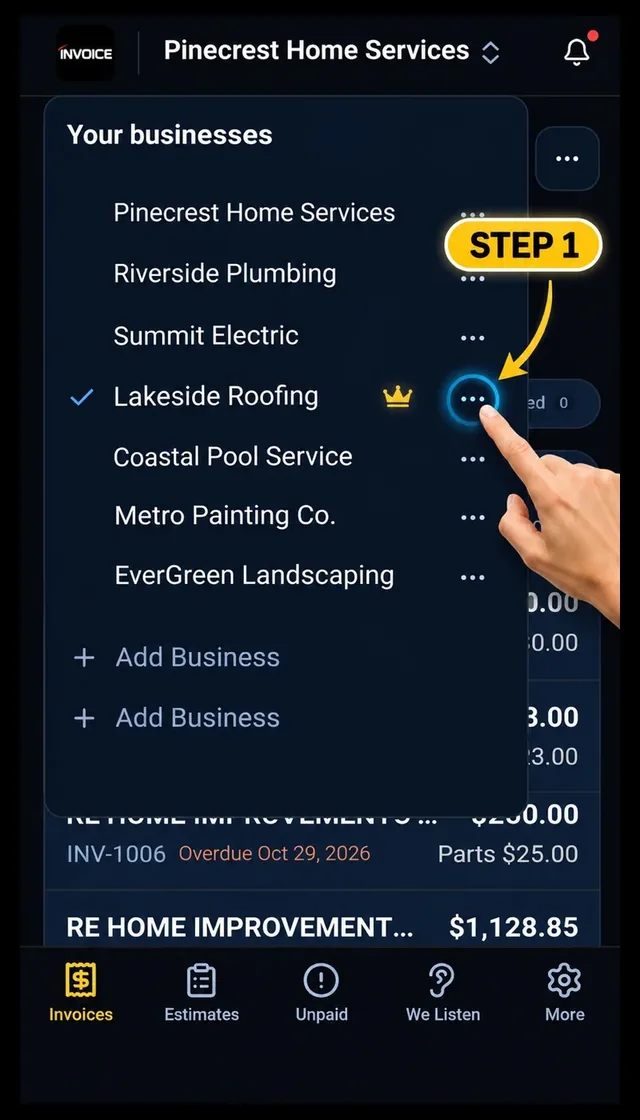
Step 1 — Choose Your Business
Select the business where you want to add a worker or partner. Open the three-dot business management menu.
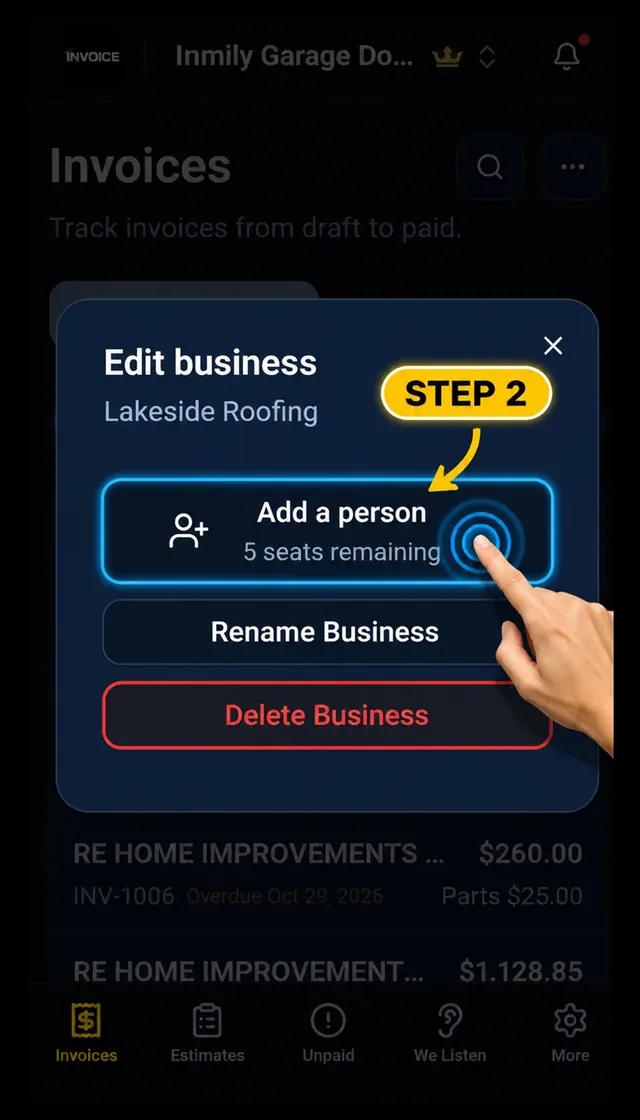
Step 2 — Add a Person
Tap “Add a person” to start inviting someone to your business team.
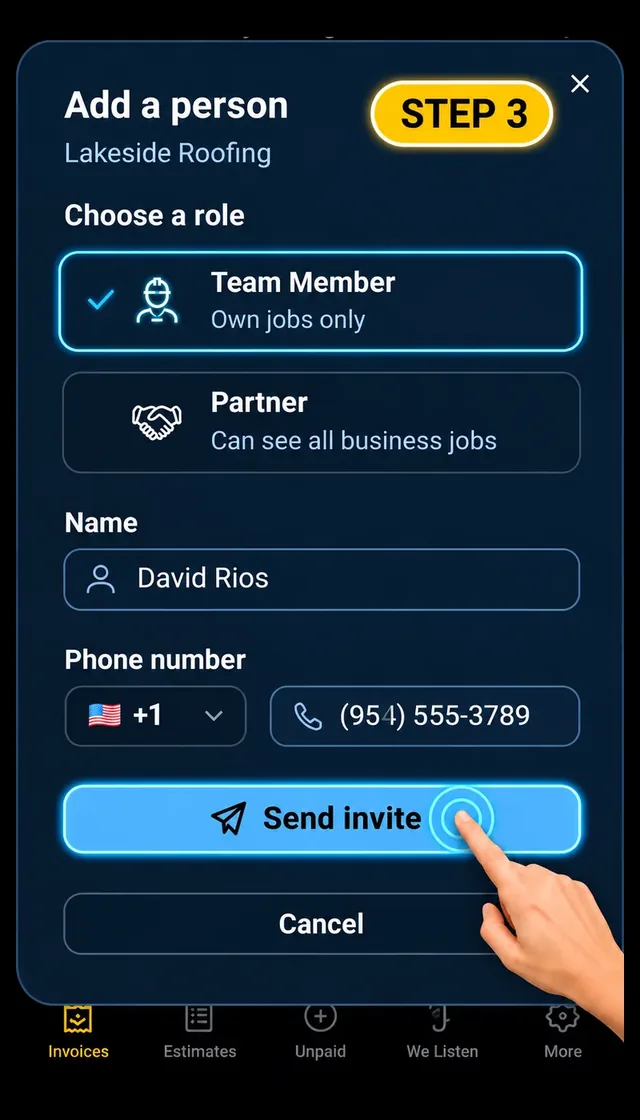
Step 3 — Choose a Role and Send Invitation
Choose Team Member or Partner, enter the person’s name and phone number, and send the invitation.
Team Members work with their assigned business access, while Partners have broader business visibility.

Step 4 — Invitation by Text Message
The invited person receives an SMS invitation containing a secure link to join your InvoiceChief team.

Step 5 — Request to Join
The invited person opens the invitation link and taps “Request to join.”
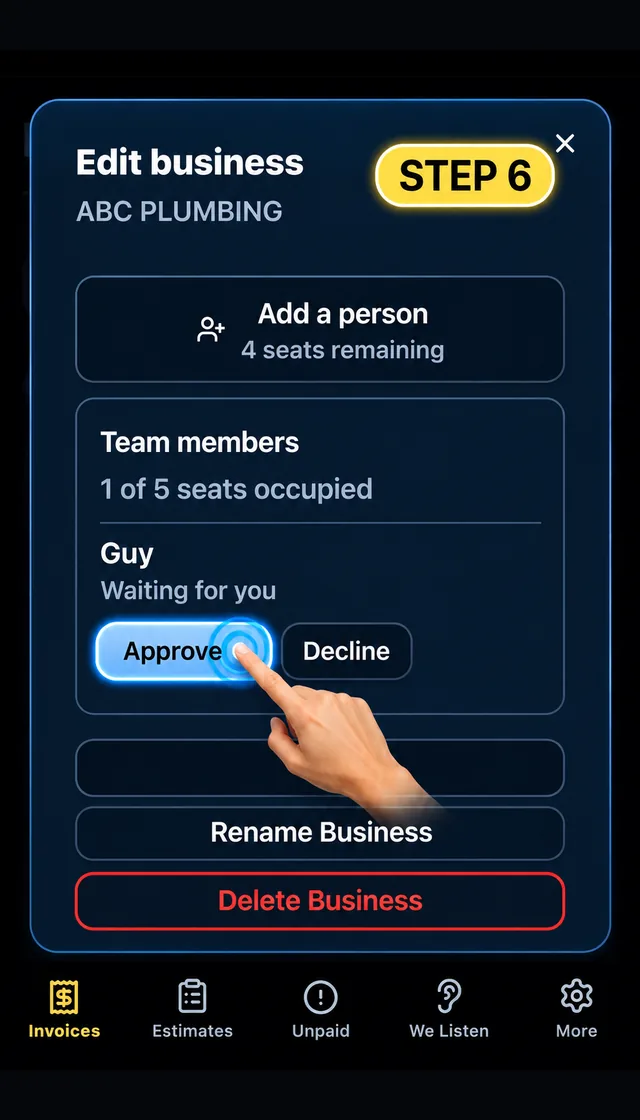
Step 6 — Owner Approval
The business owner reviews the request and taps “Approve” to authorize the new team member.
Paid Invoice Calculator for Contractors
Chief Team Exclusive
Instant Invoice Calculator
Select Paid Invoices. See Your Numbers Instantly.
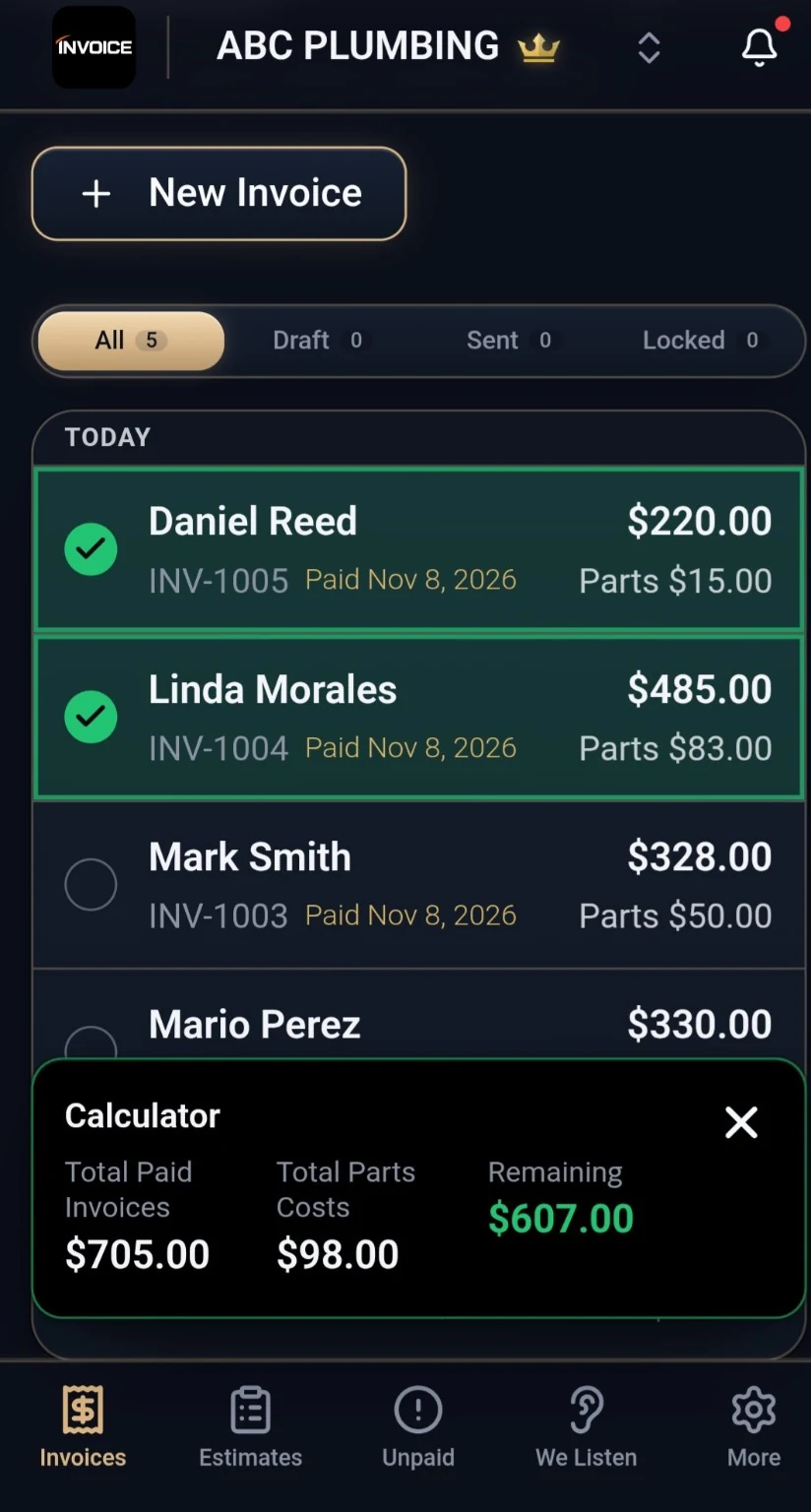
Want to quickly see how much you’ve collected from completed jobs? With InvoiceChief’s Instant Invoice Calculator, press and hold a paid invoice, select the invoices you want to review, and see your numbers immediately.
The calculator shows your total paid invoices, total parts costs, and remaining amount—all without spreadsheets or manual calculations. It’s a convenient tool for business owners, team members, and partners.
No reports to create. Nothing to save. Just select, calculate, and get back to work.
Ready to Make Invoicing Easier?
From your first invoice to managing multiple businesses and growing a team, InvoiceChief gives you the tools to work professionally and stay organized. Start free and upgrade when your business needs more.
Already have an account? Sign in